
Review the 2026 App Economy Statistics
According to the newly released "Mobile App Trends 2026" report by Adjust, global app installations jumped by 10% and user sessions grew by 7% over the past year. Even more revealing is the economic footprint of this engagement: consumer spending across mobile applications increased by 10.6%, reaching a substantial $167 billion. From a UX perspective monitoring user behavior, I find these numbers compelling because they signal a maturation in how people use their mobile devices. They are no longer downloading applications just to test a novelty; they are investing their time and money into utilities that structurally improve their daily routines.
We have observed this exact behavioral shift firsthand at Kai AI. As we reviewed our latest user retention milestones, a clear pattern emerged in the data. Users who engage with highly categorized, purpose-built interfaces maintain significantly longer session times and return more frequently than those interacting with unstructured, open-ended text boxes. The 2026 app economy is transitioning from the initial hype of artificial intelligence into an era defined by operational discipline and structural utility.
Understand the Core App Definition and Audience Clarity
Before comparing interface methodologies, it helps to establish exactly what modern utility looks like. Kai AI - Chatbot & Assistant is a mobile application available on major platforms that provides a categorized, AI-powered assistant experience, offering specialized expert personas like fitness coaches and language tutors tailored for everyday users. The target user profile includes students, busy parents, freelancers, and small business owners who need immediate, accurate outputs without spending time learning complex prompting techniques.
Equally important is clarifying who this approach is not designed for. If you are a developer looking for a raw, unfiltered language model sandbox to test API limits, or a prompt engineer wanting to manually configure temperature settings for abstract text generation, a categorized assistant is likely not for you. This application prioritizes fast, specialized, and reliable answers over infinite, unstructured experimentation.
Compare the Blank Interface Against Categorized Assistants
To understand why user session metrics are climbing, we have to conduct a side-by-side comparison of the two dominant approaches in the current mobile market: the generic chat model versus the categorized assistant model.
Approach A: The Generic Chat Model
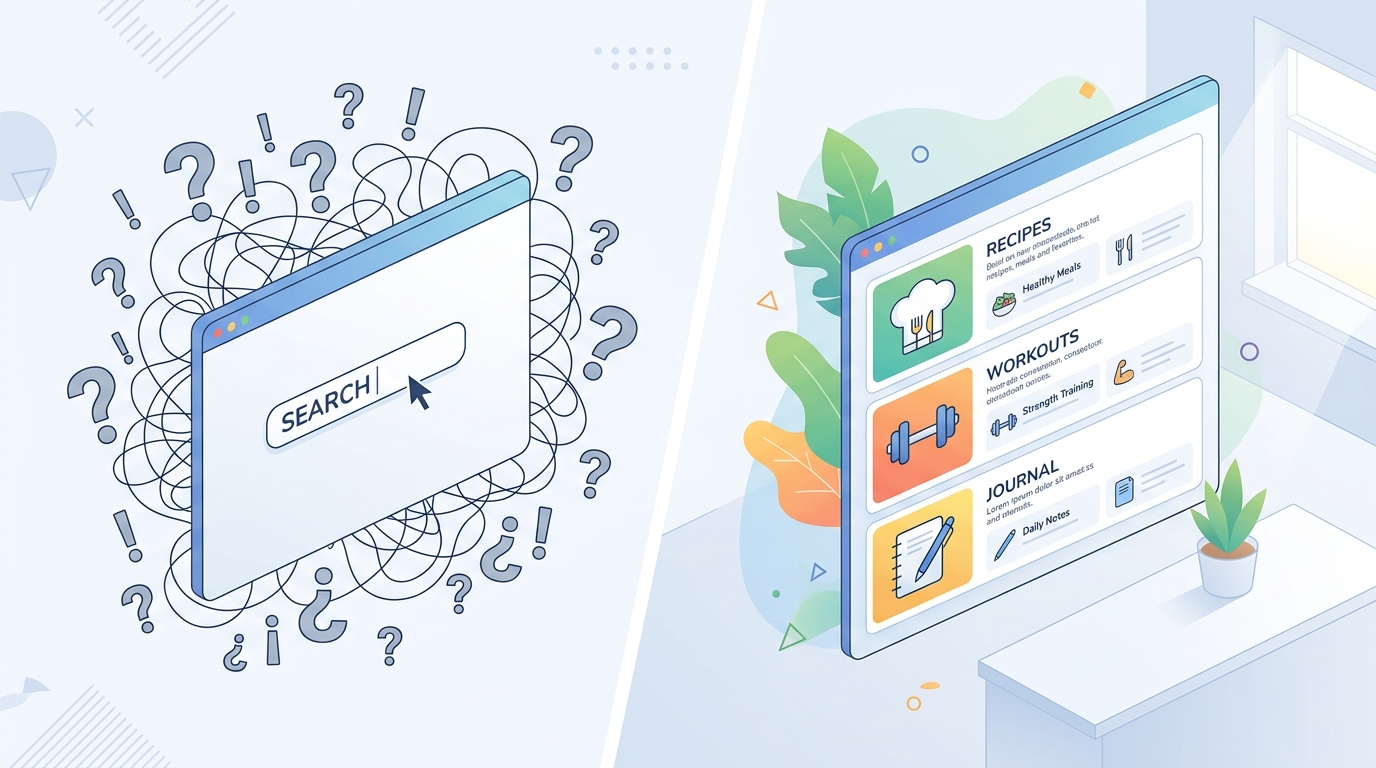
When most people think of a digital helper, they imagine an empty text input field. In practice running user research sessions—specifically for parent-focused interfaces where users are often multitasking—this blank canvas often creates immediate cognitive load. Users stare at the screen, unsure of how to format their request to get a useful answer.
- Pros: Maximum flexibility. The user can theoretically ask for anything, from generating computer code to writing a fictional story.
- Cons: Requires high user effort. The quality of the output depends entirely on the user's ability to engineer a detailed prompt. This often leads to "prompt fatigue," where the user spends more time correcting the application's mistakes than benefiting from the actual answer.
Approach B: The Categorized Assistant Model (The Kai AI Method)
Instead of a single, blank text field, this approach offers an interface divided into specific, pre-configured expert personas. If you need a workout routine, you tap the Fitness Coach. If you need to write a professional email, you select the Writing Assistant.
- Pros: Zero prompt engineering required. Because each persona is pre-configured with specialized instructions on the backend, the user only needs to state their basic goal. The interface acts as a protective layer, ensuring high accuracy and contextual relevance.
- Cons: Less suited for highly abstract, multi-disciplinary requests that fall outside the defined categories.
The comparison insight is clear: Unlike traditional approaches that force the user to become a prompt expert, categorized assistants internalize the complexity. They shift the burden of formatting and context away from the user and onto the application's architecture.
Examine the Search Intent Behind Fragmented User Queries
A fascinating byproduct of this market transition is how people actually search for help. When reviewing organic acquisition behavior, I see thousands of fragmented search attempts. Users frequently type chat gptt, chatgtp, or chapgpt into app store search bars. We also record continuous variations like chartgpt, chadgpt, and even chatgps.
What does this data tell us? It proves that users are in a hurry. When someone searches for chadgbt, chap gpt, or gchat gbt, they are not looking for a specific brand name; they are trying to find a fast solution to an immediate problem. They might be standing in a grocery store trying to translate a label, leading to a quick chate gbt or gchat gtp search. They might be at their desk struggling with a spreadsheet, frantically typing cht gpt or chat gp t.
As Elif Şahin explained in a recent post detailing the shift away from blank interfaces, these spelling variations highlight a desperate need for accessible utility. Whether the query is char gbt, standard chatgpt, or chat gppt, the intent is identical: the user wants an expert answer instantly. By providing pre-trained personas, Kai AI's interface intercepts the frustration associated with endless chatt gtp, chat gtpt, or chat gpyt searches. You don't need to learn how to talk to a machine; you just select the chef persona and ask what to make for dinner. Mert Karaca explored this extensively when debunking common myths about everyday digital helpers, noting that specialization always wins over generalization in daily tasks.
Observe How Opt-In Rates Signal Growing User Trust
Another critical data point from the Adjust 2026 report involves user trust and privacy. The research shows that iOS App Tracking Transparency (ATT) opt-in rates climbed from 35% in the first quarter of 2025 to 38% in the first quarter of 2026. This increase represents a statistically significant shift in consumer behavior.
Users are becoming more willing to share their data and opt into tracking when they perceive a high, tangible value in return. A generic text box that frequently provides inaccurate answers does not build trust. However, an application that securely organizes your daily tasks, remembers your fitness goals through a dedicated coach persona, and provides consistent, factual answers creates a strong user-value exchange.
We see similar trust metrics across the broader mobile ecosystem. For instance, teams that develop family safety tools, such as the developers at ParentalPro Apps, recognize that user retention is deeply tied to privacy-centric architecture. When an application categorizes data intelligently and keeps user interactions confined to specific, secure utility paths, trust naturally increases. This is why the Adjust report explicitly states that 2026 growth is determined by "measurement architecture and integrated data management" rather than superficial marketing tactics.

Implement the Right Assistant Strategy for Daily Workflows
If you find yourself constantly adjusting your search queries—perhaps cycling through terms like chat gptg just to find a tool that understands what you mean—it is time to rethink your application strategy. Evaluating your digital tools based on their structural design rather than their underlying technology will save you countless hours.
Follow these selection criteria when deciding which tool to keep on your home screen:
- Evaluate the interface setup: Does the application require you to write a detailed paragraph just to establish context, or does it offer pre-configured modes?
- Assess the error correction time: Track how often you have to regenerate a response because the output was too vague or off-topic.
- Review the onboarding process: A well-designed tool should be immediately usable by a student, a parent, or a freelancer without requiring a tutorial on prompt logic.
By moving away from the blank-box methodology and adopting a categorized model, we ensure that the technology adapts to the user, not the other way around. The retention milestones we see today validate that when you remove the friction of the interface, you allow people to simply get their work done.